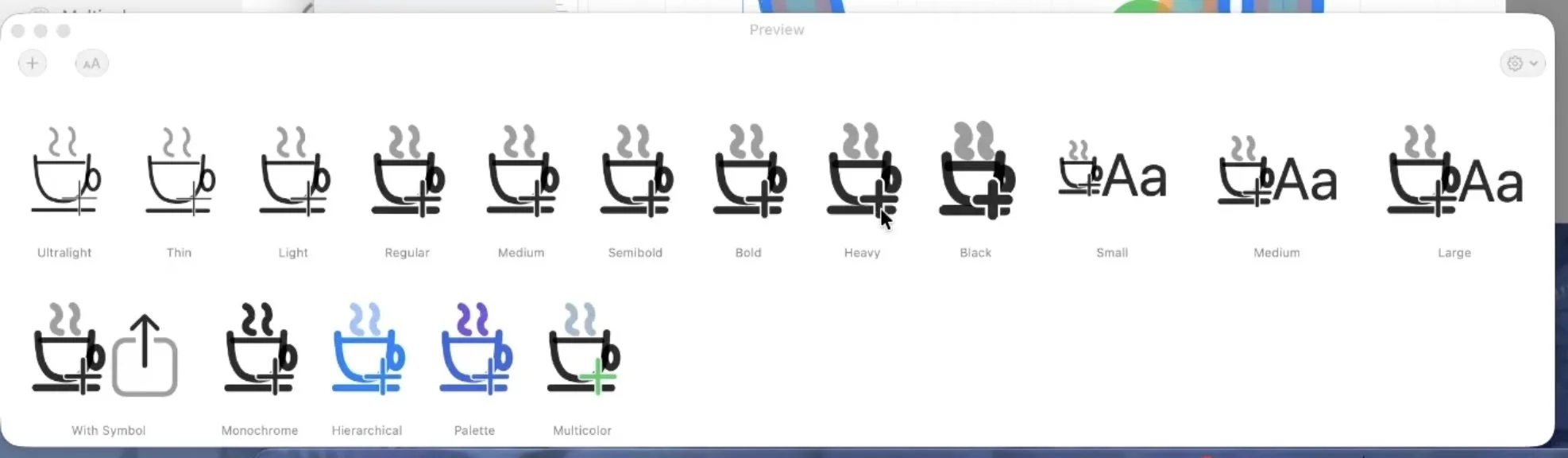
McKinley, the SF Symbols editor I've been building, has a preview panel. Its job is specifically to show you how Apple's rendering engine will display your symbol. (McKinley's canvas uses my own renderer, so it's important the user has a way to be sure their symbol will work with Apple's APIs.)
SF Symbols rendering does a surprising amount behind your back: it interpolates nine weights from three masters, applies optical size adjustments, resolves hierarchical opacity ladders, and changes some of this between OS releases. Any preview I rendered myself might diverge from the real thing in ways nobody would notice until the symbol was in an app looking subtly wrong. (Obviously I aim to get my canvas rendering with the exact same nuance as Apple's renderer, but programmers are fallible and the fewer ways things can diverge, the better.)
Apple provides no API for "here's my SVG, render it as a symbol". For a normal app using a custom SF Symbol, the symbol is compiled from an Asset Catalog in Xcode into a .car file (a compiled asset catalog) at build time. But there's no 'build time' when I want to update a preview in McKinley.
My workaround involves compiling your symbol into a .car file at runtime, on every edit, by patching bytes into a template, then loading that temporary .car file into McKinley via NSBundle.
The one door in
As mentioned above, custom SF Symbols usually get into an app via putting a .symbolset in an asset catalogue, Xcode's actool compiles it into Assets.car, and at runtime you load the symbol by name. There's no "make me a symbol from this SVG" call — the compiled catalogue is the only entrance.
It turns out that while producing a .car is locked up in Xcode's tooling, consuming one is completely public API. Put an Assets.car inside a bundle, load it, and ask for the image:
let bundle = Bundle(url: bundleURL)!   // a directory containing Contents/Resources/Assets.car
let image = bundle.image(forResource: "bell.badge.fill")!

print(image.representations)           // [NSSymbolImageRep]

let black = image.withSymbolConfiguration(
  .init(pointSize: 120, weight: .black))!
That NSSymbolImageRep is the interesting part. It's the same representation class you get from NSImage(systemSymbolName:). The system has recognised a real compiled symbol, and from here everything works: weights, scales, rendering modes, variable colour, animations etc.
Which means the whole problem reduces to how to produce a valid .car file using nothing but ordinary file I/O.
Why not just run actool?
For a normal app with fixed assets, you compile at build time and you're done. But McKinley is an editor — the symbol changes every time you drag a node, and the preview needs to follow. The catalogue has to be compiled at runtime.
The obvious answer is to run actool at runtime, but alas you can't do that in a Mac App Store app. (As of writing this post I haven't decided whether to ship McKinley via the App Store.) actool is part of Xcode, so you can't assume it's installed; you can't bundle it (it's Apple's binary, and it drags half of Xcode's asset-catalogue stack along with it); and the App Sandbox won't let you exec it anyway. CoreUI — the private framework that owns the .car format — does contain an in-memory catalogue compiler, but calling it is private API, which is also a no-go on the App Store.
What's actually in a .car
The .car format is undocumented, but other people have explored it. Alexandre Colucci's Reverse Engineering the .car file format is a good starting point. viraptor/actool is a Rust reimplementation of actool whose src/car.rs and src/bom.rs have helpful code describing the various fields. And macOS ships assetutil, which dumps a JSON description of any .car (assetutil --info Assets.car) which was super useful for checking anything I built. The rest was hex-editor archaeology: compiling small symbol sets with actool and diffing what changed.
The shape of the file:
- The container is a BOM store — "Bill of Materials", a NeXT-era format that also underlies installer receipts. A header points at a block table (
count, then(offset, length)per block) and a list of named variables, each mapping a name to a block index:CARHEADER,KEYFORMAT,RENDITIONS,FACETKEYS, and friends. - Everything references blocks by index, not by offset. This is what makes the whole approach practical: you can move a block's bytes anywhere in the file — including appending a longer replacement at the end — and just repoint its table entry. Initially I was worried that I'd have to update offsets all over the place, but that turned out not to be the case.
RENDITIONSis a tree whose leaf lists the actual assets as(value block, key block)pairs. The key is a vector ofuint16attribute values, ordered perKEYFORMAT's attribute-ID list. For symbols, two attributes matter:0x1Ais the glyph weight and0x1Bis the glyph size. Sadly they weren't in viraptor's rust code (it predates SF Symbols I think) so I had to do a bit of digging and trial and error here.- Each value block is a "CSI" rendition (aka a "CoreTheme Structured Image" — Apple's internal name for multi-rendition images in an asset catalog): a fixed header, some TLV metadata, then the payload.
(Naturally, the BOM half is big-endian and the CSI half is little-endian, so you get to write both sets of integer helpers.)
Here's the annotated structure McKinley actually reads and writes:
BOMStore container (big-endian)
  header: u32 blockTableOffset @16; u32 varsOffset @24
  block table: u32 count, then count × (u32 offset, u32 length)
  vars: u32 count, then count × (u32 blockIndex, u8 nameLen, name)
        → "CARHEADER", "KEYFORMAT", "RENDITIONS", …

KEYFORMAT block (little-endian): "kfmt" tag, u32 0, u32 attrCount, attrCount × u32 attrID
  attrID 0x11 = identifier · 0x1A = glyph weight (UL=1, Reg=4, Blk=9)
  0x1B = glyph size (S=1, M=2, L=3)

RENDITIONS leaf: u16 isLeaf, u16 count, 2 × u32 links,
  count × (u32 valueBlockIdx, u32 keyBlockIdx), then the inline keys
  (each key = attrCount × u16, ordered per KEYFORMAT)

One SVG-master rendition (a value block, little-endian):
  CSI header (184 bytes): magic "ISTC"; pixelFormat @24 = "SVG ";
    name @40 (≤127 bytes, NUL-terminated); u32 tlvLength @168;
    u32 renditionDataLength @180
  TLV list: 8-byte (u32 tag, u32 length) headers
    tag 0x3FA — glyph metrics: standardPointSize @+0x0C,
      baseline f32 @+0x10, capline f32 @+0x14, templateVersion f32 @+0x18,
      alignmentRectInsets 4 × f32 @+0x1C (left, top, right, bottom)
    tag 0x3FB — rendering mode + multicolour/hierarchical flags
  payload: "DWAR" + u32 isCompressed (0 = raw, 1 = LZFSE) + u32 length + payload bytes
Luckily the payload is just SVG text. When actool compiles a symbol, it decomposes your template into several single-weight master SVGs, one per weight-and-size, and stores each one as a rendition payload, optionally LZFSE-compressed. McKinley can easily split out the per-weight-and-size SVG exports, so finally I was able to join the dots.
Patch, don't write
There were two ways to produce the file: write a BOM store from scratch (porting viraptor's writer), or ship a template .car, built offline by Apple's own actool, and patch the payloads at runtime.
I chose patching, since although I'd enjoy being nerd sniped by writing a full BOM store, real artists ship software rather than go down that kind of rabbit hole! The template is a placeholder symbol (bell.badge.fill, as it happens) compiled into exactly the master-grid structure McKinley needs. At runtime, the builder:
- Parses the header, block table, and named variables. (I didn't want to hardcode byte offsets here either, in case I change the shipped template.)
- Reads
KEYFORMATto find where the weight and size attributes sit within each key. - Walks the
RENDITIONSleaf and keeps only the SVG masters (the blocks whose payload isDWAR), dropping the template's pre-rendered bitmap caches — the engine regenerates those from the SVGs. The leaf is rewritten in place with the reduced entry list, and the rendition counts in the tree andCARHEADERare patched to match. - For each master, builds a replacement block and repoints the table.
The replacement block reuses the template rendition's CSI header and TLVs verbatim, then patches the fields that describe our symbol instead of the bell:
// New payload: this master's SVG, as raw text.
var dwar = [UInt8]("DWAR".utf8)
appendLE32(&dwar, 0)                        // isCompressed = 0
appendLE32(&dwar, UInt32(svg.count))
dwar.append(contentsOf: svg)

// New block: the template's CSI header + TLVs, with our numbers written in.
var block = Array(out[valueOffset ..< valueOffset + payloadStart])
writeLE32(&block, 180, UInt32(dwar.count))  // renditionDataLength

if let tag = find(block, bytes: [0xFA, 0x03, 0x00, 0x00]) {  // the 0x3FA metrics TLV
  writeLE32(&block, tag + 0x0C, UInt32(master.referencePointSize.rounded()))
  writeF32(&block, tag + 0x10, Float(master.baseline))
  writeF32(&block, tag + 0x14, Float(master.capline))
  writeF32(&block, tag + 0x18, 6.0)         // templateVersion, see below
  writeF32(&block, tag + 0x1C, Float(master.insetLeft))   // then top, right, bottom
}
block.append(contentsOf: dwar)

// Append at the end of the file (4-aligned) and repoint the block-table entry.
while out.count % 4 != 0 { out.append(0) }
let newOffset = out.count
out.append(contentsOf: block)
writeBE32(&out, entryPos(rendition.valueIdx), UInt32(newOffset))
writeBE32(&out, entryPos(rendition.valueIdx) + 4, UInt32(block.count))
The baseline and capline in that metrics TLV are what let the engine scale your artwork's cap height to the requested point size, so they have to match the coordinate space of the SVG you're splicing in. The templateVersion float gets stamped down to 6.0 because CoreUI gates parsing on it, and the preview has to render on the app's deployment floor (macOS 15 is the SF Symbols 6 generation). (If I ever start supporting a feature requiring Symbols 7.0, such as custom draw on/draw off paths, I'll have to dynamically use the template version that matches the running OS.)
For the alignment insets, I had to experimentally derive their order by saving and loading various symbols. They're left, top, right, bottom, fwiw!
Renaming a symbol without moving a byte
The symbol in the template is named bell.badge.fill, and the name is embedded all over the file — facet keys, rendition names, even bell.badge.fill.svg source-filename metadata. The preview needs each rebuild to have a fresh name, because CoreUI's symbol-image cache is process-global and keyed by name: reuse the name and every re-render returns the cached image rather than parsing it anew.
Renaming things in a binary format usually means shifting every offset after the name. Unless the new name is exactly the same length… but since we don't care about what the name is, then it can be!
// "mck" + 12 digits is exactly 15 bytes — the length of "bell.badge.fill".
let facetName = "mck" + String(format: "%012d", buildCounter)
replaceAll(&out, find: Array("bell.badge.fill".utf8),
                 with: Array(facetName.utf8))
A same-length find-and-replace across the whole file. Every offset stays valid, and every symbol build gets a unique name so the cache always misses.
The odd way .car files store weights
A .car does not store 27 pre-drawn variants (9 weights × 3 scales) of a symbol. It stores three masters — Ultralight, Regular, and Black — and interpolates the rest. The masters must be point-compatible: same paths, same control-point counts, same order. Rendering, say, Semibold is then element-wise arithmetic over the point arrays:
point[i] = regular[i] + s_ul × (ultralight[i] − regular[i])
                      + s_bk × (black[i]      − regular[i])
with the (s_ul, s_bk) scalars looked up from the requested weight. It's a clever scheme — nine weights for the storage cost of three — and Apple's docs tell you three Small-size masters are all you ever need to provide.
They are not, and I'm not sure if this is an Apple bug or just an undocumented feature. McKinley has per-weight geometry: a shape can move between weights. The issue I found is, if I supplied the three small masters, I was expecting Apple to synthesise Black-Large by just scaling up Black-Small. But it didn't do that, Black-Large displayed as an interpolated mixture of Black-Small and Regular-Small.
The mechanism, once I dug into the rendering stack, turned out to be a size-keyed weight scalar — an optical-sizing table. As the size scale grows, heavy weights are deliberately pulled back towards Regular:
| Size | Black rendered as |
|---|---|
| Small | 100% Black |
| Medium | 91.6% Black |
| Large | 72.6% Black |
For Apple's own symbols, whose per-weight geometry only varies by small optical tweaks, applying 72.6% of a tiny delta is invisible — which is presumably why this has never bothered anyone. Apply 72.6% of a large positional delta and your shape sits in the wrong place. (Probably for most custom symbols, nobody would notice this behaviour either. But I had pixel-comparison tests checking my rendering code, so I dug into this until I could make them pass!)
The fix was: don't leave the interpolator any gaps to fill. If a rendition exists for a specific weight-and-size, the engine uses it directly and the scalar table never runs. So McKinley emits the full 3×3 grid — Ultralight, Regular, and Black masters at Small, Medium and Large, the M/L geometry scaled up about the box centre. The template .car is compiled with all nine slots so there are nine DWAR payloads to patch on every rebuild.
One related trap deserves a mention: if the per-weight masters aren't point-compatible — different outline structure between weights — you get an Objective-C exception thrown when trying to display it. When generating symbols the blessed way, actool checks if paths match and adds Interpolatable=True as a flag bit in the glyph-metrics TLV if so. Since the template .car file always has Interpolatable=True, I perform my own check before trying to load it.
Loading it
Putting it all together, the patched bytes get written into a minimal bundle in a temporary directory (Contents/Resources/Assets.car plus an Info.plist), and loaded:
try car.write(to: resources.appendingPathComponent("Assets.car"))
try infoPlist(bundleID: "com.mckinleysymbols.symbolpreview.b\(n)")   // unique per build
  .write(to: bundleURL.appendingPathComponent("Contents/Info.plist"),
         atomically: true, encoding: .utf8)

let bundle = Bundle(url: bundleURL)!
From SwiftUI it's just Image(facetName, bundle: bundle), and Apple's renderer takes it from there. Every weight, scale, and rendering mode from that one .car, and the symbol-effect animations all load fine, because as far as the system is concerned this is simply a real symbol. Note the unique bundle identifier: CoreUI also caches catalogues per bundle, so each rebuild gets a fresh identity everywhere the caches look — name, bundle ID, and path.
So the preview panel now shows Apple's own rendering of your symbol, live, rebuilt on every edit, and the entire pipeline is writing a data file and loading a bundle. There's no private API, no helper processes, nothing the Mac App Store objects to.
Of course, the .car format is undocumented and versioned, and Apple could rearrange it in any OS release. The template-patch approach keeps the exposure small: Apple's own tool builds the container, and the patches are confined to payloads and a handful of well-understood fields.